
You May Not Need Reanimated Measure
 Maciej Stosio•Nov 24, 2025•5 min read
Let me take you on a short journey of implementing loading skeletons from scratch. You’ll see the problems I encountered, how I wanted to solve them with React Native Reanimated’s measure, and why it was wrong.
The other day I was faced with the task of replacing beloved ActivityIndicators with skeletons. Naturally, I assumed there must be a library that does that, but none of them met my requirements. After skimming through the implementations, I committed what every developer does from time to time— I decided to try building it myself.
The process started off pretty smoothly. I threw a masked view, new Expo’s experimental linear gradient and spiced it with some good old Reanimated:
const Skeleton = ({ style }: { style: ViewStyle}) => {
  const progress = useSharedValue(-100);

  useEffect(() => {
    progress.value = withRepeat(
      withSequence(
        withTiming(-100, { duration: 0 }),
        withTiming(100, { duration: 3000 })
      ),
      0
    );
  }, []);

  const animatedStyle = useAnimatedStyle(() => {
    return {
      transform: [{ translateX: `${progress.value}%` }],
    };
  });

  return (
    <MaskedView
      style={style}
      maskElement={<View style={{ ...style, backgroundColor: "#000" }} />}
    >
      <Animated.View style={animatedStyle}>
        <View
          style={{
            ...style,
            experimental_backgroundImage: "linear-gradient(90deg, #001A72 45%, #6676aa 50%, #001A72 55%)",
            marginHorizontal: "-100%",
            width: "300%" ,
          }}
        />
      </Animated.View>
    </MaskedView>
  );
};
It looked pretty neat, until I used it to build something more complex:
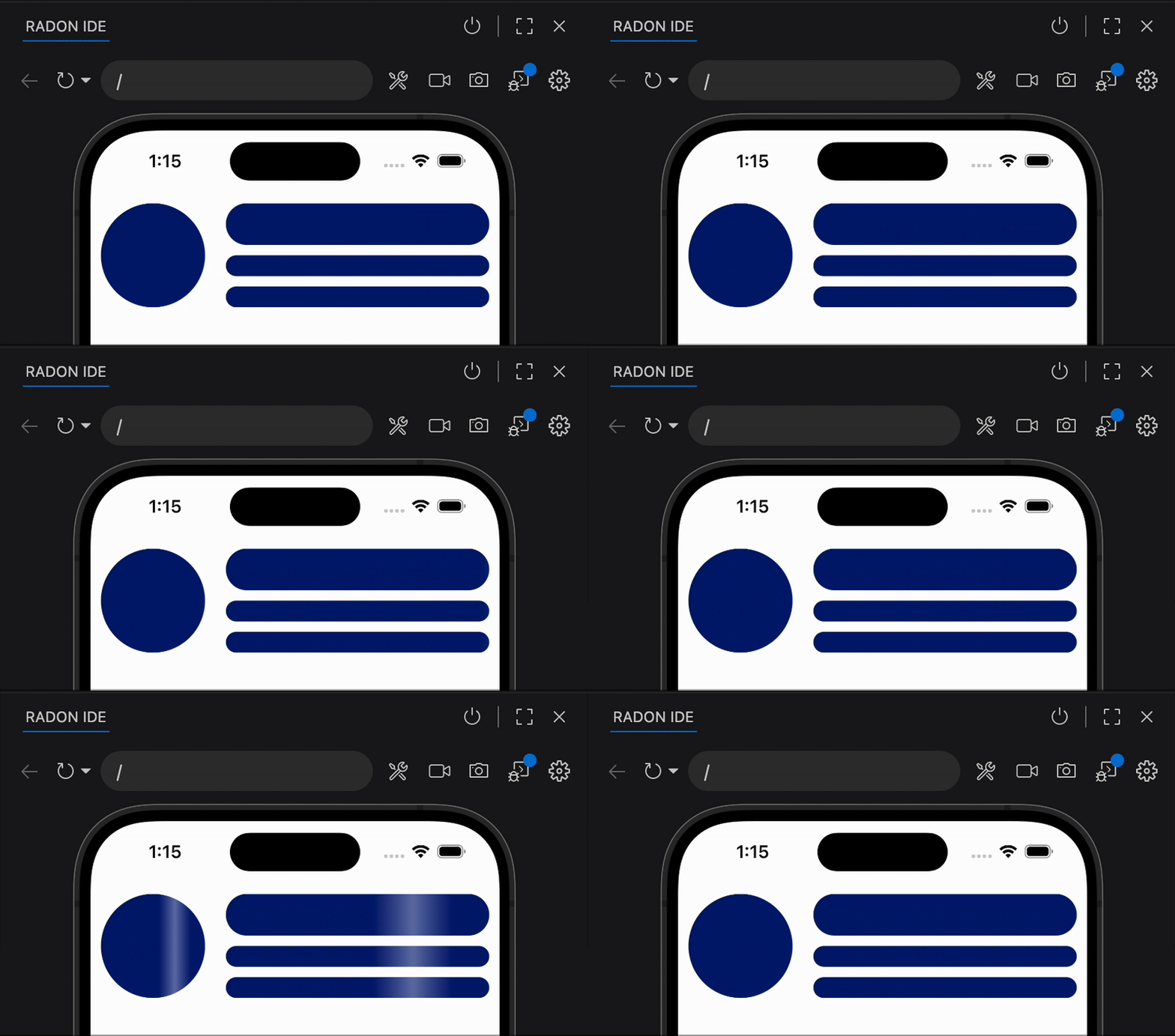
So, we’re facing two issues: the gradients are different sizes, and the shimmer is supposed to flow across all the elements, not each one separately.
The first part was easy — I grabbed the device width using useWindowDimensions and replaced all the percentages with a constant value.
For the second issue, I figured it would be nice to get the element’s position on the screen and shift the animation accordingly. I couldn’t get it to work with the onLayout prop, so I checked the Reanimated documentation and found measure.
measurelets you synchronously get the dimensions and position of a view on the screen (…)
It worked like a charm, though I had to lean on the Elvis operator since measure needs to be used on rendered components. Otherwise, it just returns null.
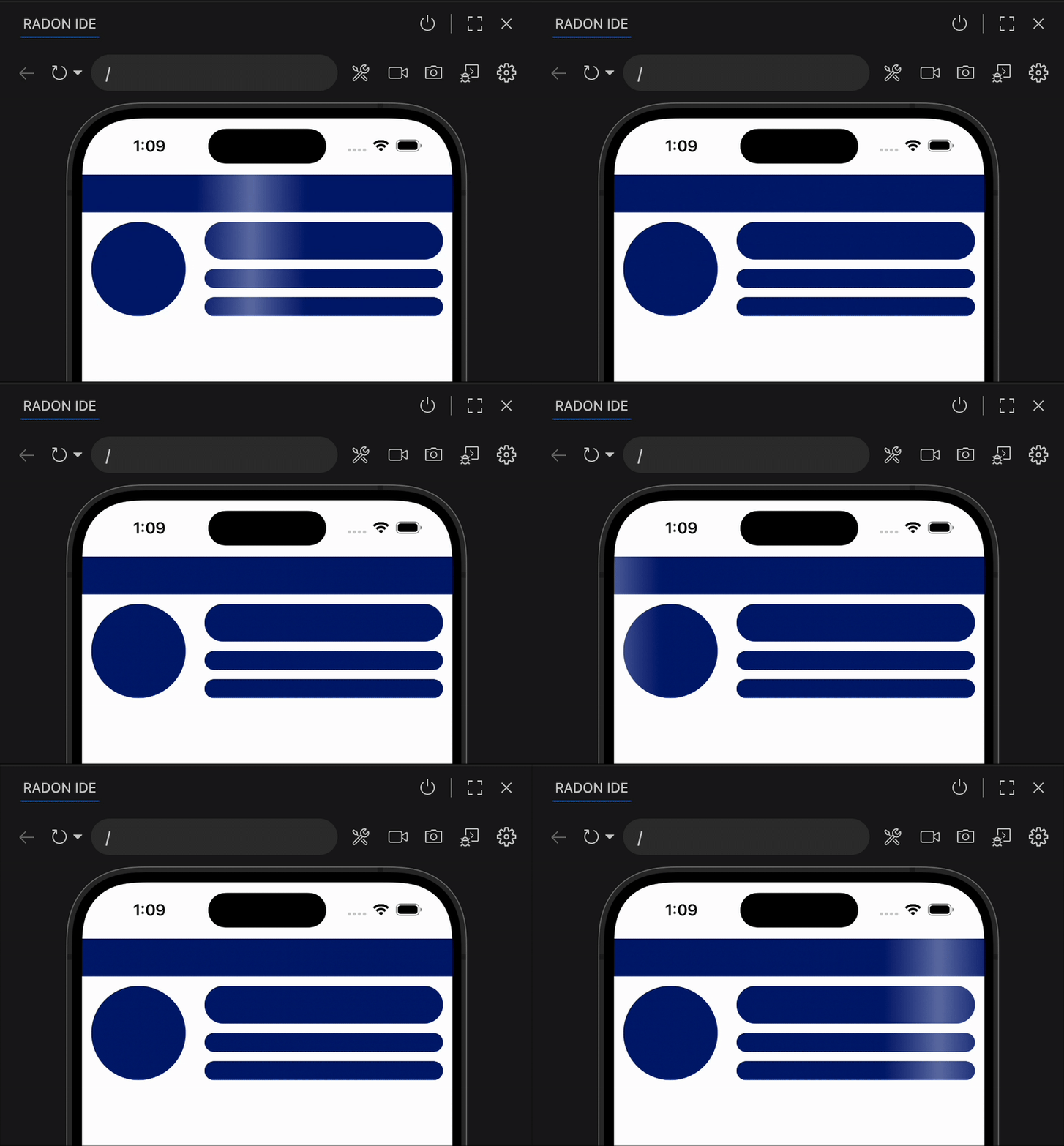
const Skeleton = ({ style }: { style: ViewStyle}) => {
  const animatedRef = useAnimatedRef()
  const dimension = useWindowDimensions()
  const progress = useSharedValue(0);

  useEffect(() => {
    progress.value = withRepeat(
      withSequence(
        withTiming(-dimension.width, { duration: 0 }),
        withTiming(dimension.width, { duration: 3000 })
      ),
      -1
    );
  }, []);

  const animatedStyle = useAnimatedStyle(() => {
    const measured = measure(animatedRef)
    return {
      transform: [{ translateX: progress.value - (measured?.pageX ?? 0)}],
    };
  });

  return (
    <MaskedView
      style={style}
      maskElement={<View style={{ ...style, backgroundColor: "#000" }} />}
    >
      <Animated.View ref={animatedRef}>
        <Animated.View style={animatedStyle}>
          <View
            style={{
              ...style,
              experimental_backgroundImage: "linear-gradient(90deg, #001A72 45%, #6676aa 50%, #001A72 55%)",
              marginHorizontal: -dimension.width,
              width: 3 * dimension.width,
            }}
          />
        </Animated.View>
      </Animated.View>
    </MaskedView>
  );
};
The only thing was…

“The view has some undefined, not-yet-computed or meaningless value (…)"
Yeah I know, thus the null-check…
After digging through the documentation and trying a few if hacks to work around the problem, I took the elevator to the open-source realm to vent about it.
They pulled the Reanimated source code, showed me where the warning came from, and shared the story that they had added it a while back — just waiting for someone to complain. Well, here I am.
After a quick brainstorming session, we realized I could use React Native’s built-in measure method. It works the same way but doesn’t need to run on every frame, which would be computationally expensive:
const [pageX, setPageX] = useState(0)

(...)

useLayoutEffect(() => {
  ref.current?.measure((_x, _y, _width, _height, pageX) => setPageX(pageX))
}, [])

const animatedStyle = useAnimatedStyle(() => {
  return {
    transform: [{ translateX: progress.value - pageX}],
  };
});
It worked just like before, but I no longer had to worry about null checks. By running it just once, I also saved some CPU. useLayoutEffect ensures everything is calculated before the user sees it. So… in the end, I didn’t need Reanimated’s measure!
The takeaway
Thanks for joining me on this journey. As we all know, Reanimated is a powerful tool, but we should keep in mind that some of its features should be used with caution. In my case, when I replaced Reanimated’s measure with the native one, I got a cleaner, faster solution without warnings.
Psst… Once I realized I didn’t need to use measure in useAnimatedStyle, I saw that I could switch to the new Reanimated CSS Animations:
import MaskedView from "@react-native-masked-view/masked-view";
import { useLayoutEffect, useRef, useState } from "react";
import { StyleSheet, Text, useWindowDimensions, View, ViewStyle } from "react-native";
import Animated from "react-native-reanimated";

const Skeleton = ({ style }: { style: ViewStyle}) => {
  const ref = useRef<View>(null)
  const [pageX, setPageX] = useState(0)
  const dimension = useWindowDimensions()

  useLayoutEffect(() => {
    ref.current?.measure((_x, _y, _width, _height, pageX) => setPageX(pageX))
  }, [])

  return (
    <MaskedView
      style={style}
      maskElement={<View style={{ ...style, backgroundColor: "#000" }} />}
    >
      <View ref={ref}>
        <Animated.View style={{
          animationName: {
            from: {
              transform: [
                {translateX: -dimension.width - pageX}
              ]
            },
            to: {
              transform: [
                {translateX: dimension.width - pageX}
              ]
            }
          },
          animationDuration: 3000,
          animationIterationCount: "infinite",
          animationTimingFunction: "ease",
        }}>
          <View
            style={{
              ...style,
              experimental_backgroundImage: "linear-gradient(90deg, #001A72 45%, #6676aa 50%, #001A72 55%)",
              marginHorizontal: -dimension.width,
              width: 3 * dimension.width,
            }}
          />
        </Animated.View>
      </View>
    </MaskedView>
  );
};
We’re Software Mansion: multimedia experts, AI explorers, React Native core contributors, community builders, and software development consultants.