
Meet Argent: Agentic Toolkit to Control, Debug and Profile iOS applications
 Kacper Kapuściak•May 8, 2026•5 min read
Argent gives AI coding agents direct access to the iOS Simulator so they can run, inspect, debug, and profile iOS and React Native applications autonomously. At its core, Argent is a set of skills and an MCP server that gives coding harnesses direct access to the iOS Simulator. Read to learn how it can improve your AI-Assisted coding workflow for building mobile applications.
How Argent works
Today, coding agents like Claude Code, Cursor, or Codex produce vast amounts of code, but they often struggle with running it. Argent helps with that: it launches the app, interacts with the UI, inspects what happened, and then helps to fix what broke. The result is a single closed loop where the agent writing the code also verifies it by running it in the app in the same session.
Let agent tap, swipe, and type for you
The agent boots simulators, launches apps by bundle ID, opens deep links, and drives the UI through taps, swipes, pinches, rotations, keyboard input, and hardware buttons. Every interaction returns an optimized screenshot so the agent understands the new state before the next step. When several actions can be chained Argent groups them into a single run-sequence flow saving tokens in the process.
Let agent diagnose what is broken
The agent attaches to Metro, walks the React component tree at any coordinate, evaluates JavaScript in the running app, reads console logs grouped by level and similarity, and inspects HTTP traffic at both the JavaScript fetch layer and the native NSURLProtocol layer. When a tap misses or a component renders the wrong props, the agent has the same visibility you would with React DevTools.
Let agent find performance bottlenecks
Argent records React and native iOS profiles in the same run, then cross-correlates results from them. A slow React commit can be traced to the native stack frame that caused it. Instruments data surfaces UI hangs, render cascades, and memory leaks. The agent re-queries a single capture for multiple issues, so investigating a hang and a leak does not require profiling twice.
A typical session looks like this: you ask Claude to help you fix performance of one of the screens in your app. The agent autonomously launches the app, starts the profiler, scrolls through the screen, generates a performance report and proposes a fix. The simulator window stays minimized the entire time so you can do your other work in the meantime.
How we're shipping with Argent at Software Mansion
Argent is built for teams building iOS and React Native apps with an AI assistant in the loop. At Software Mansion, we rely on it daily across multiple engineering teams, and the early adoption has been a great success.
One of our developers working with a client in the US banking sector used Argent's profiler to cut re-renders by ~50% on a high-traffic screen. While profiling, the agent surfaced performance bugs that had been in production for over two years, including issues no one had thought to look for.
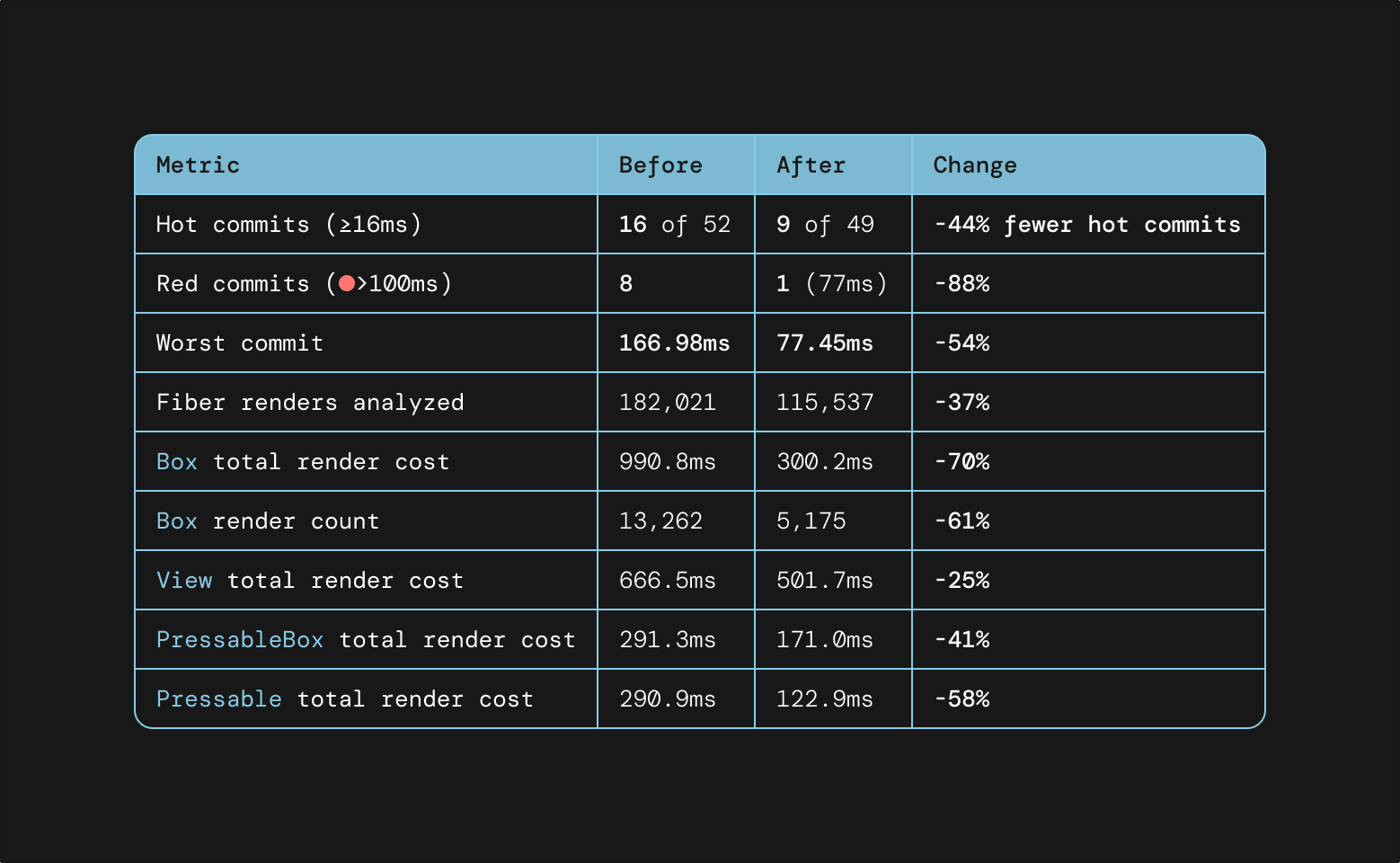
Other Software Mansion developers for a fintech company used Argent across several screens in the app to cut average render times by roughly 30% and session time by 22%.
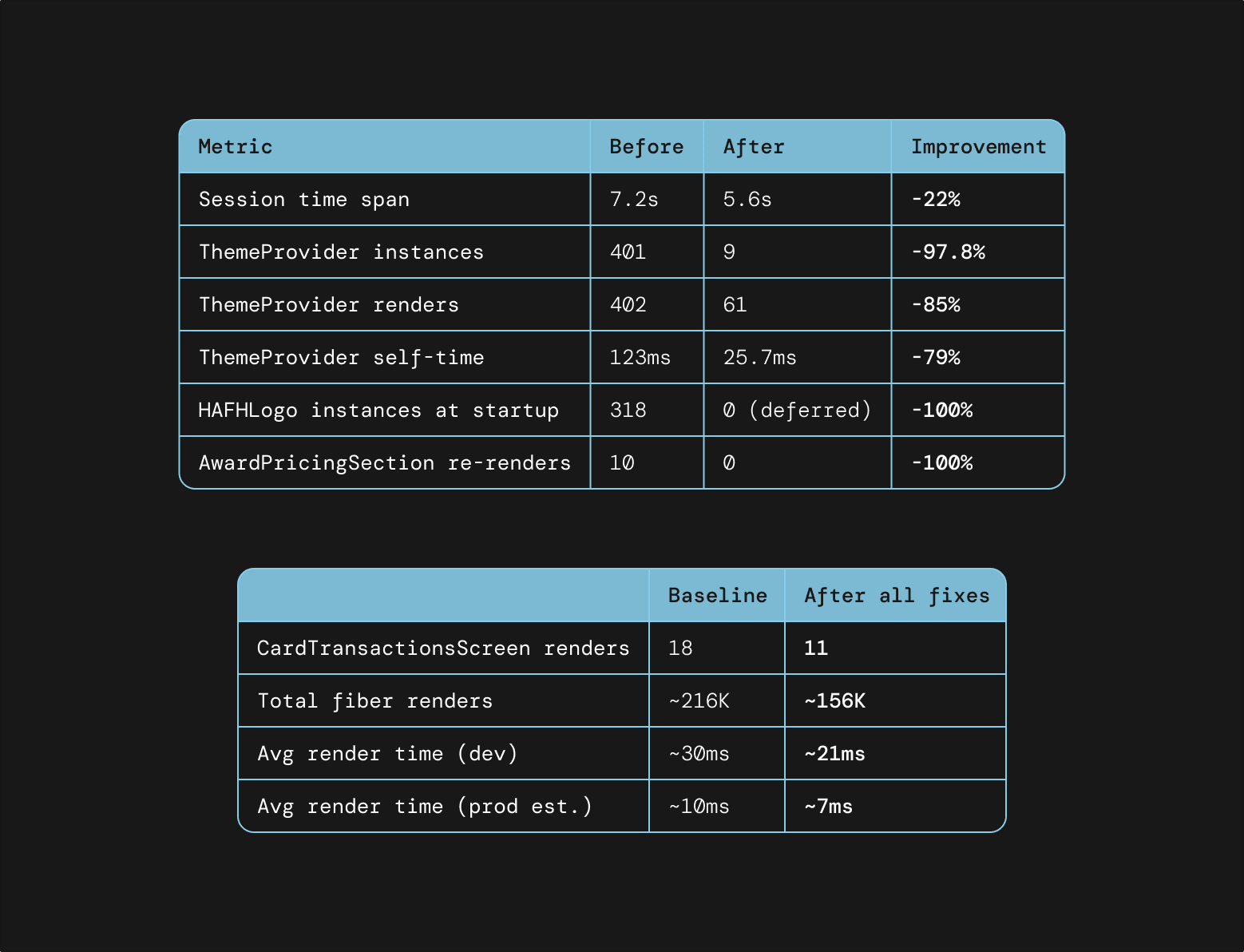
In React Native Screens, we use Argent for the gestures, transitions, and edge-case interactions where e2e testing frameworks fall short. The agent drives the example app through flows, captures component trees, and reports back with screenshots and logs, catching regressions that pass a green CI.
In React Native Gesture Handler, we point an agent at a bug report on GitHub and let it reproduce, diagnose, and fix the issue end-to-end. Argent gives it the simulator control, debugger access, and component inspection it needs to close the loop without a human stepping in to tap, scroll, or read logs.
What makes Argent different from other tools out there?
The key differentiator of Argent is speed and depth. Other tools usually rely on XCUITest, which has to switch between the test runner and the app for every interaction, which considerably slows things down. Argent talks to the simulator directly, so your AI agent can interact with your app without additional waiting.
Also, other tools usually focus only on controlling the simulator. Argent offers a full suite of diagnostic tools. Your agent can reproduce the problem, diagnose its root cause and fix it all within a single session.
Get started with Argent
Argent is free and open-source, published on npm as @swmansion/argent. It runs on macOS with Xcode and Node.js 18 or newer, and currently drives iOS Simulators. Android Emulator is in the works.
Install it with just one command:
npx @swmansion/argent initSetup takes about a minute. The installation wizard detects your setup and writes the MCP server config for you. Argent works with any agent that can run shell commands, with first-class support for many popular coding harnesses like Claude Code, Cursor, Codex, Copilot, Google Gemini CLI, OpenCode, and more.
Once the server is registered, ask your agent to launch your app, tap around, profile a screen, or replay a defined flow. No additional flags, accounts, or API keys required.
If Argent saves you time, make sure to give Argent a star on GitHub. Found a bug or have a workflow you wish Argent supported? Open an issue.